
DJs
See the Camelot code, then pick a next track one step away for a smooth mix.
Key, relative key, Camelot code and BPM from one file.
Drop in an MP3, WAV, M4A or FLAC file and the Key Finder shows its key, relative key, Camelot code and BPM in seconds. The file is read in your browser and never uploaded.
Drop an audio file here or
MP3, WAV, M4A or FLAC, up to 20 MB
We ran “Windows Down”, a summer pop song made here, through the Key Finder.
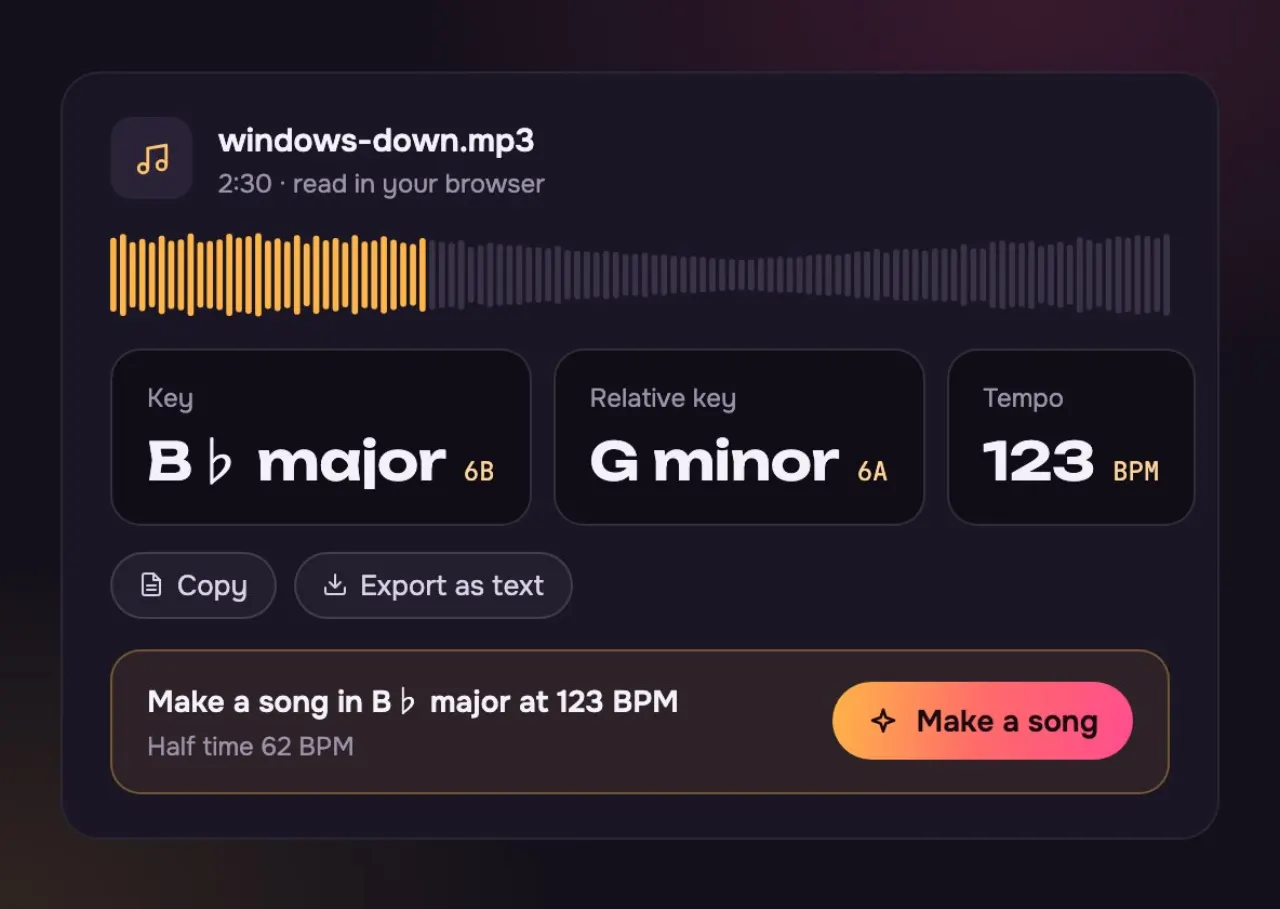
The key: the note the song comes home to, and a bright, major sound.
The relative key. Same notes, so some apps name the song this way.
Tap along at half speed and you get 62. Both are right.
What it reads, what it shows and what it costs.
Three steps and a few seconds.
Choose an MP3, WAV, M4A or FLAC file up to 20 MB from your device.
See the key and its relative key, the Camelot code and the BPM. Copy any of them.
Tune your guitar, pick a key for your voice, plan a DJ mix, or make a new song in that key.
Singers pick a key that suits their voice; DJs pick the next track.
See the Camelot code, then pick a next track one step away for a smooth mix.

Find the key before you practise, then move it up or down to suit your voice.
On the Camelot wheel, the safe moves are one step round or straight across.
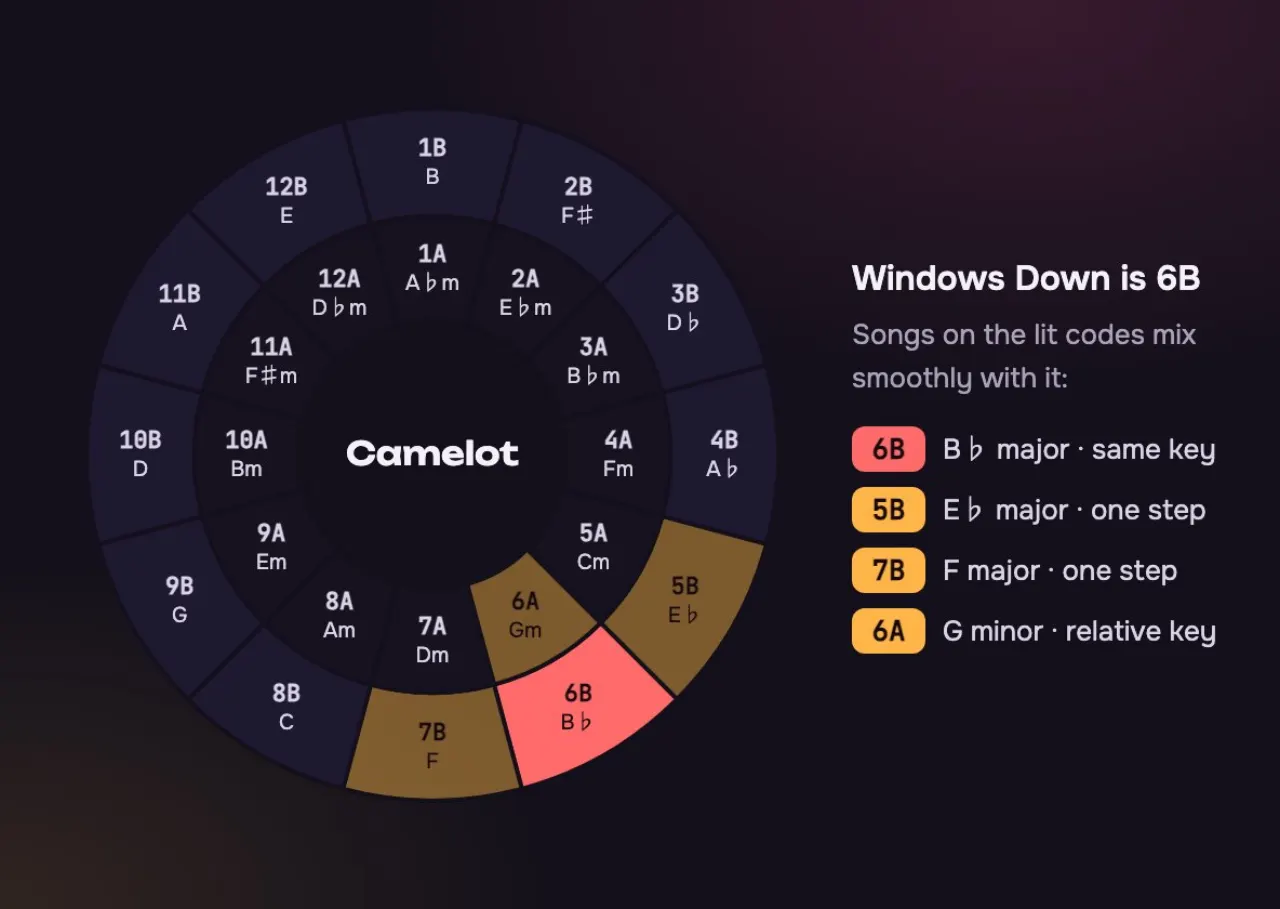
One step round the wheel: F major and C major. The change feels smooth.
Straight across: G minor, the relative key. Same notes, a darker mood.
It can clash. Use a short break or a drum-only bar between the songs.
Three names you will see for one song, and when each one helps.
| Key | Relative key | Camelot code | |
|---|---|---|---|
| What it says | Key: The home note and mode: B♭ major | Relative key: The minor key with the same notes: G minor | Camelot code: A number and a letter for mixing: 6B |
| Same notes? | Key: Yes | Relative key: Yes, every one | Camelot code: Yes, it names the same key |
| Use it to | Key: Sing or play along | Relative key: Read charts that use the minor name | Camelot code: Pick the next track in a DJ set |
| Why apps differ | Key: Most apps show this one | Relative key: Some show this one instead | Camelot code: DJ apps show this one |
If another app says G minor and we say B♭ major, you are both right: they are the same set of notes.
They are relative keys: the same seven notes, with a different home note. A happy, bright song usually reads as the major one; a dark, sad one as the minor one.
Very accurate on songs with a steady beat and a clear home note. Songs that change key, speed up and slow down, or have no clear home note are harder, so check the result by ear.
It shows the main key of the song. If the last chorus moves up, that part is in a new key; cut it out with the Audio Cutter and run it on its own.
No. The file is read in your browser and never sent to us. Close the page and it is gone.
Yes. Hum the note the song comes home to, often the last note of the chorus, and find it on a piano or guitar. Then listen: bright usually means major, sad usually means minor.
This page reads a file on your device, so a stream will not work here. Without a file, sing or hum the last note of the chorus and find it on a piano: that note usually names the key.
It is the key on the Camelot wheel that DJs use. B♭ major is 6B and its relative minor, G minor, is 6A. Songs with the same number, or one number apart, mix smoothly.
Load Windows Down from the button under the drop zone. It reads B♭ major, 6B on the wheel, at 123 BPM.
Not covered here.Ask us something else
Use the key and tempo you just found. Describe a mood, pick a voice and hear two full songs in about a minute.
Make a song in B♭ majorTwo free songs, no account needed.